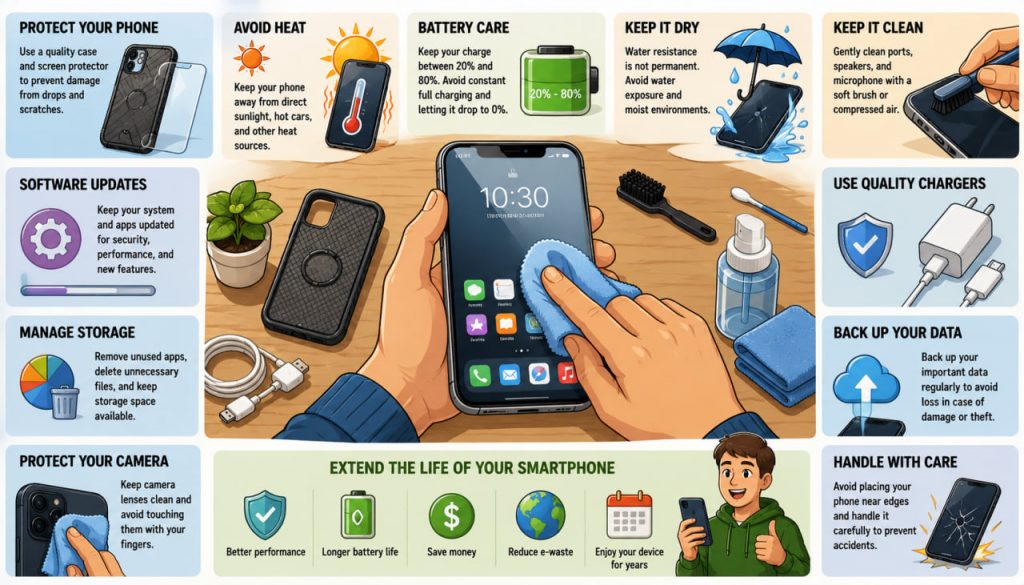
Modern smartphones are among the most advanced pieces of technology most people own. These compact devices serve as cameras, navigation systems, communication tools, entertainment centers, and portable computers. Because smartphones play such an important role in daily life, proper care can significantly extend their lifespan, improve performance, and reduce repair costs.
Many smartphone failures are not caused by manufacturing defects but by everyday habits. Heat, moisture, dust, battery stress, and accidental damage gradually affect device reliability. Fortunately, a few simple practices can help users keep their phones functioning efficiently for years.
Understanding how smartphones age and what factors contribute to wear can save both money and frustration.
Why Smartphone Maintenance Matters
Most modern smartphones contain:
- Powerful processors
- High-capacity batteries
- Sensitive cameras
- Advanced displays
- Miniaturized electronic components
Although these devices are remarkably durable, they are not indestructible.
Regular care can extend a smartphone’s useful life, reduce performance degradation, and postpone expensive replacements.
Longer device lifespans also reduce electronic waste, making proper maintenance beneficial for both consumers and the environment.
Protecting the Battery
The battery is usually the first major component to show signs of aging.
Most smartphones use lithium-ion batteries, which gradually lose capacity over time.
Factors that accelerate battery wear include:
- High temperatures
- Frequent full discharges
- Constant charging to 100%
- Fast charging under hot conditions
Many battery experts recommend keeping charge levels roughly between 20% and 80% whenever practical.
Modern smartphones often include battery optimization features that help reduce long-term degradation.
Avoiding extreme temperatures is particularly important because heat is one of the primary enemies of lithium-ion batteries.
Heat: The Silent Smartphone Killer
Excessive heat affects nearly every component inside a smartphone.
Potential consequences include:
- Reduced battery lifespan
- Processor throttling
- Display damage
- Faster component aging
Common sources of overheating include:
- Direct sunlight
- Hot vehicles
- Intensive gaming
- Extended video recording
- Charging under pillows or blankets
If a phone becomes unusually hot, allowing it to cool naturally is usually the safest approach.
Avoid placing overheating devices in refrigerators or freezers, as sudden temperature changes may cause condensation damage.
The Importance of Protective Cases
Accidental drops remain one of the leading causes of smartphone damage.
Even devices marketed as rugged can suffer:
- Cracked screens
- Damaged cameras
- Bent frames
- Internal component failures
A quality protective case can significantly reduce impact forces during falls.
Many users also install tempered glass screen protectors to reduce the risk of display damage.
The cost of protective accessories is typically much lower than the cost of screen replacement.
Keeping Ports and Speakers Clean
Dust and debris gradually accumulate inside:
- Charging ports
- Speaker grilles
- Microphones
These contaminants may cause:
- Charging problems
- Reduced sound quality
- Poor microphone performance
Cleaning should be performed carefully.
Compressed air may be useful in some situations, but excessive pressure can force debris deeper into the device.
Non-metallic tools designed specifically for electronics cleaning are generally safer than improvised objects.
Water Resistance Does Not Mean Waterproof
Many modern smartphones advertise water resistance.
However, water resistance is not permanent.
Protective seals gradually deteriorate due to:
- Age
- Temperature changes
- Physical wear
- Impacts
Even water-resistant devices can suffer damage under certain conditions.
Saltwater, chlorinated pool water, and high-pressure water exposure present additional risks.
Users should view water resistance as emergency protection rather than an invitation to expose devices to water intentionally.
Software Updates Matter
Some users postpone software updates indefinitely.
While occasional caution is understandable, updates often provide important benefits.
These may include:
- Security improvements
- Bug fixes
- Battery optimizations
- Performance enhancements
Cybersecurity experts consistently recommend keeping devices reasonably up to date.
Outdated software can expose phones to vulnerabilities that newer versions have already addressed.
Managing Storage Space
Smartphones perform best when sufficient storage remains available.
A nearly full device may experience:
- Slower performance
- Reduced responsiveness
- Application instability
Regularly removing unnecessary files can improve efficiency.
Useful habits include:
- Deleting unused applications
- Removing duplicate photos
- Clearing large downloads
- Backing up media files
Storage management becomes increasingly important as devices age.
Protecting Your Camera
Smartphone cameras have become highly sophisticated.
Many flagship devices now rival dedicated cameras under certain conditions.
However, camera modules are vulnerable to:
- Scratches
- Dust
- Impact damage
Keeping camera lenses clean improves image quality significantly.
Simple microfiber cloths designed for optics are often sufficient for routine cleaning.
A dirty lens can reduce photo quality more than many users realize.
Expert Perspective
Technology repair advocate Kyle Wiens, co-founder of iFixit, has long emphasized the value of maintaining and repairing electronics rather than replacing them prematurely.
His work highlights that many devices remain fully functional for years when users take basic preventative measures and address minor problems before they become major failures.
This philosophy aligns closely with sustainable technology use and responsible smartphone ownership.
Security Is Part of Maintenance
Physical care is important, but digital protection matters as well.
Every smartphone user should consider:
- Strong passwords
- Biometric authentication
- Two-factor authentication
- Regular backups
Data loss can sometimes be more costly than hardware damage.
Regular backups help protect valuable information such as:
- Photos
- Contacts
- Documents
- Messages
A well-maintained smartphone is both physically protected and digitally secure.
When to Replace the Battery
Eventually, all lithium-ion batteries age.
Signs of battery wear may include:
- Rapid discharge
- Unexpected shutdowns
- Excessive heat during normal use
- Reduced runtime
In many cases, replacing the battery can significantly extend the life of a smartphone.
This option is often far less expensive than purchasing a new device.
Battery replacement has become an increasingly important part of sustainable electronics ownership.
Reducing Electronic Waste
Extending smartphone lifespan benefits the environment.
Manufacturing new smartphones requires:
- Rare metals
- Energy
- Water
- Complex supply chains
Keeping devices functional for longer reduces demand for replacement hardware and helps decrease electronic waste.
Even extending a phone’s life by one or two years can have a meaningful environmental impact.
Interesting Facts
- Modern smartphone processors can perform billions of calculations per second.
- Lithium-ion batteries gradually lose capacity even when not actively used.
- Heat is one of the primary factors affecting battery longevity.
- Smartphone cameras now contain sophisticated image-processing systems powered by artificial intelligence.
- Many phones contain dozens of different chemical elements, including rare-earth metals.
- Electronic waste is one of the fastest-growing waste streams globally.
Glossary
- Lithium-Ion Battery — A rechargeable battery technology used in most modern smartphones.
- Battery Degradation — The gradual loss of battery capacity over time.
- Tempered Glass — Strengthened glass commonly used for screen protection.
- Processor Throttling — Automatic reduction of processor speed to prevent overheating.
- Two-Factor Authentication — A security method requiring two forms of identity verification.
- Electronic Waste (E-Waste) — Discarded electronic devices and components.