Solid-state drives, better known as SSDs, have changed the way computers feel. A laptop with an SSD boots faster, opens apps faster, copies files faster, and feels more responsive than the same machine using an old hard disk drive. For many users, replacing an HDD with an SSD is one of the most noticeable upgrades possible.
Unlike traditional hard drives, SSDs do not use spinning magnetic disks or moving read/write heads. Instead, they store information electronically inside memory chips. This design makes them faster, quieter, more durable, and more energy efficient.
But SSDs are not just “big flash drives.” Inside every modern SSD is a complex system of memory cells, controllers, firmware, cache, error correction, and wear management. Understanding how SSDs work helps explain why they are fast, why they eventually wear out, and why not all SSDs perform the same.
SSD vs HDD: The Main Difference
A traditional hard disk drive stores data on spinning magnetic platters.
A mechanical arm moves across the disk surface to read or write information.
This means HDD performance is limited by physical movement.
An SSD works differently.
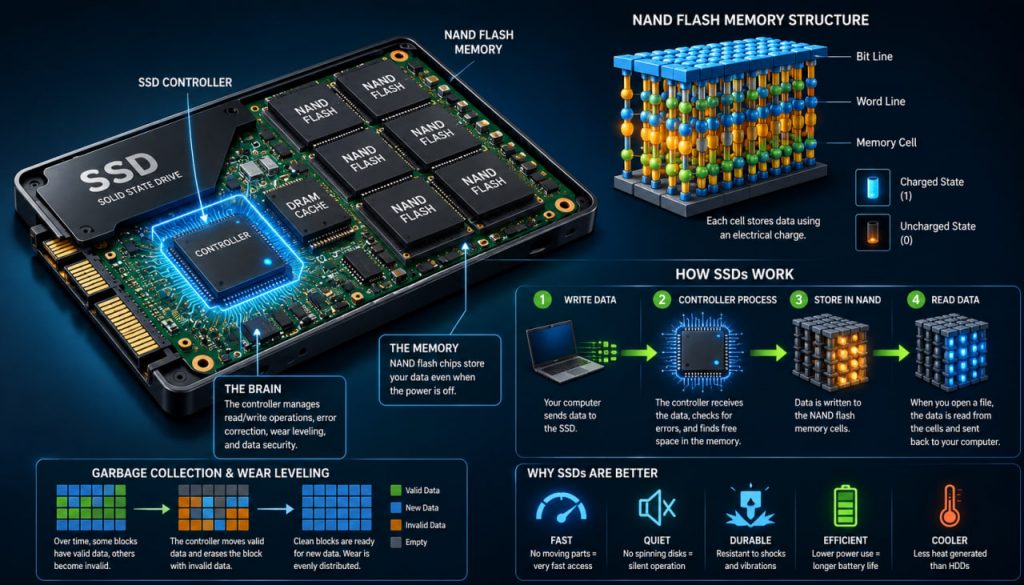
It stores data in NAND flash memory, a type of non-volatile memory that keeps information even when the power is off.
Because there are no moving parts, an SSD can access data almost instantly.
The biggest advantage of an SSD is that it removes mechanical delay from storage.
This is why SSDs are especially good at opening programs, loading operating systems, and handling many small files quickly.
What Is NAND Flash Memory?
NAND flash is the core storage technology inside most SSDs.
It stores data using tiny memory cells that hold electrical charge.
Each cell represents digital information as electrical states.
A basic version stores one bit per cell:
- Charged state
- Uncharged state
Modern SSDs often store more than one bit per cell by using multiple charge levels.
Common NAND types include:
- SLC — one bit per cell
- MLC — two bits per cell
- TLC — three bits per cell
- QLC — four bits per cell
SLC is fast and durable, but expensive.
TLC and QLC store more data in the same physical space, making SSDs cheaper and larger, but usually with lower endurance.
Higher density lowers cost, but it also makes memory management more difficult.
How Data Is Written to an SSD
Writing data to an SSD is more complex than simply placing files into empty cells.
NAND flash memory is organized into:
- Pages
- Blocks
- Planes
- Dies
- Channels
SSDs usually write data in small units called pages, but they erase data in larger units called blocks.
This creates a challenge.
An SSD cannot simply overwrite existing data in the same way an HDD can. Before old data can be replaced, the block containing it may need to be erased.
To handle this efficiently, SSDs use clever firmware and background processes.
When you edit or delete a file, the SSD often marks old data as invalid and writes new data somewhere else.
Later, it cleans up unused space through a process called garbage collection.
The SSD Controller: The Brain of the Drive
The SSD controller is one of the most important parts of the drive.
It manages how data is stored, moved, protected, and retrieved.
The controller handles:
- Reading and writing data
- Error correction
- Wear leveling
- Garbage collection
- Bad block management
- Encryption
- Cache control
- Communication with the computer
A good controller can make a major difference in real-world performance.
Two SSDs with similar NAND memory may behave very differently if one has a better controller and firmware.
The controller is what turns raw flash memory into a reliable storage device.
Why SSDs Are So Fast
SSDs are fast for several reasons.
First, they have no spinning disks or moving heads.
Second, they can access many memory cells in parallel.
Third, modern SSDs use advanced interfaces that allow very high data transfer rates.
Older SSDs often used the SATA interface, which was originally designed for hard drives.
Modern high-performance SSDs usually use NVMe over PCIe, which allows much faster communication with the processor.
This is why NVMe SSDs can be several times faster than SATA SSDs in sequential data transfer.
However, daily speed does not depend only on maximum numbers.
For normal use, random access performance often matters more than peak speed.
An SSD feels fast because it can find small pieces of data almost instantly.
What Is Wear Leveling?
NAND flash memory has a limited number of program/erase cycles.
This means each memory cell can only be written and erased a certain number of times before it becomes unreliable.
To prevent some cells from wearing out too quickly, SSDs use wear leveling.
Wear leveling spreads write operations across the drive instead of repeatedly using the same physical cells.
This helps extend SSD lifespan.
Without wear leveling, frequently changed files could damage one area of memory while other areas remain barely used.
Wear leveling keeps the drive aging evenly.
TRIM: Helping the SSD Stay Efficient
When you delete a file, the operating system usually removes the reference to it, but the storage device may not immediately erase the actual data.
With SSDs, this can cause performance problems if the drive does not know which data is no longer needed.
The TRIM command solves this.
TRIM tells the SSD which blocks contain deleted data and can be cleaned later.
This helps the SSD manage free space more efficiently and maintain performance over time.
Most modern operating systems support TRIM automatically.
DRAM Cache and SLC Cache
Many SSDs use cache to improve performance.
Some drives include DRAM cache, which stores mapping tables and helps the controller quickly find data.
Other drives use part of their NAND as a faster temporary cache, often called SLC cache.
This allows the SSD to write data quickly at first.
However, when the cache fills up, write speeds may drop, especially on cheaper QLC-based drives.
This is why some SSDs perform very well in short tests but slow down during large file transfers.
Cache makes SSDs feel faster, but sustained performance depends on the whole design.
SSD Endurance: Do SSDs Wear Out?
Yes, SSDs can wear out, but modern drives are designed to last for many years under normal use.
Manufacturers often rate endurance using TBW, or terabytes written.
This number estimates how much data can be written to the drive before reaching its rated endurance limit.
For everyday users, SSD endurance is usually not a major concern.
Normal activities such as browsing, writing documents, watching videos, and gaming rarely wear out a quality SSD quickly.
Heavy workloads are different.
Video editing, database servers, scientific computing, and constant large file writes can stress an SSD much more.
Expert Perspective
Computer storage researchers and engineers often emphasize that SSD performance is not determined by NAND alone. The real quality of an SSD depends on the combination of flash memory, controller design, firmware, caching strategy, error correction, and thermal management.
This is why professional reviews often test sustained write speed, random performance, latency, endurance, and heat behavior instead of only looking at advertised maximum read speeds.
A good SSD is not just fast in a headline specification; it stays reliable and consistent under real workloads.
Why SSDs Can Slow Down
SSDs can slow down for several reasons.
Common causes include:
- Nearly full storage
- Filled cache
- High temperature
- Weak controller
- Lack of free blocks
- Heavy background cleanup
- Low-end QLC NAND
- Poor firmware optimization
Keeping some free space available helps SSDs work efficiently.
Many users notice better long-term performance when they avoid filling the drive completely.
Thermal throttling can also reduce speed.
High-performance NVMe SSDs may need proper cooling, especially in gaming PCs, workstations, and laptops with limited airflow.
The Future of SSD Technology
SSD technology continues to improve.
Important developments include:
- Higher-layer 3D NAND
- Faster PCIe generations
- Better controllers
- Larger capacities
- Improved error correction
- More efficient power use
- Lower latency
- Better enterprise SSD endurance
Modern NAND is often built vertically in many layers, known as 3D NAND.
Instead of only shrinking cells sideways, manufacturers stack memory cells upward.
This increases capacity while helping control cost.
The future of SSDs is not only faster speed, but more storage in smaller, more efficient devices.
Why SSDs Changed Computing
SSDs changed computing because storage was once one of the slowest parts of a computer.
Processors became fast.
Memory became fast.
But hard drives remained mechanical.
SSDs removed that bottleneck.
This is why even an older computer can feel dramatically faster after switching from HDD to SSD.
The improvement is not only about benchmark numbers.
It affects everyday experience:
- Faster startup
- Faster app loading
- Faster file search
- Better multitasking
- Quieter operation
- Lower power usage
- Better shock resistance
An SSD makes a computer feel modern because it lets the rest of the system respond without waiting for a spinning disk.
Interesting Facts
- SSDs have no moving parts, which makes them more resistant to shock than traditional hard drives.
- NAND flash memory keeps data even when the power is off.
- NVMe SSDs communicate through PCIe lanes, allowing much higher speeds than SATA SSDs.
- SSDs erase data in blocks but write data in pages, which is why garbage collection is necessary.
- Wear leveling helps prevent some memory cells from wearing out faster than others.
- Filling an SSD almost completely can reduce performance because the controller has less free space to manage data efficiently.
- 3D NAND stacks memory cells vertically to increase capacity.
Glossary
- SSD — Solid-State Drive, a storage device that uses flash memory instead of spinning disks.
- NAND Flash — Non-volatile memory used in most SSDs to store data electronically.
- Controller — The processor inside an SSD that manages data, memory cells, errors, cache, and communication.
- SATA — An older storage interface commonly used by hard drives and many early SSDs.
- NVMe — A modern storage protocol designed for fast SSDs using PCIe.
- PCIe — A high-speed connection standard used for graphics cards, SSDs, and other computer components.
- Wear Leveling — A technique that spreads writes across memory cells to extend SSD lifespan.
- TRIM — A command that tells an SSD which deleted data can be cleaned up internally.