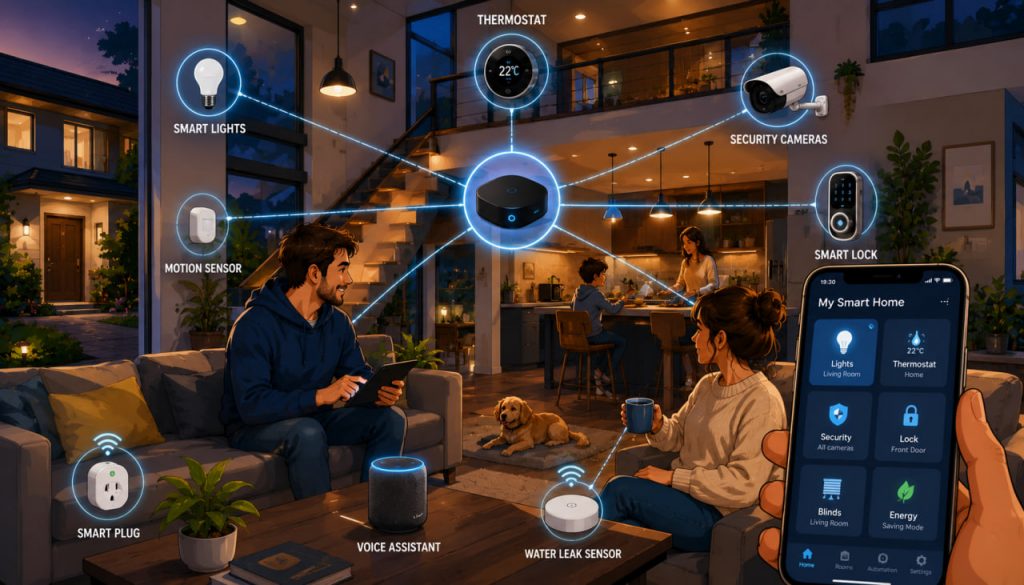
A smart home uses connected devices to automate everyday tasks, improve comfort, reduce unnecessary energy use, and strengthen household security.
Lights can switch off when rooms become empty. Heating can adjust according to schedules and temperature sensors. A water-leak detector can send an alert before a small problem becomes expensive damage.
However, a successful smart home is not created by buying as many gadgets as possible. The best smart home begins with clear goals, compatible equipment, reliable networking, and strong cybersecurity.
What Is a Smart Home?
A smart home contains devices that can communicate through a local network, the internet, or a dedicated wireless system.
Common smart-home products include:
- Smart lights and switches
- Thermostats and radiator controls
- Door locks and video doorbells
- Security cameras and motion sensors
- Smoke, water-leak, and air-quality detectors
- Smart plugs and appliances
- Motorized blinds
- Voice assistants
- Energy-monitoring systems
These devices may be controlled through an application, physical switches, voice commands, schedules, sensors, or automated routines.
True home automation means that useful actions happen automatically, not that every task requires opening an app.
Start With Problems, Not Products
Before choosing a platform, identify what you want the system to accomplish.
Useful goals might include:
- Reducing heating and electricity costs
- Detecting leaks early
- Improving security
- Helping an elderly family member
- Controlling lights more conveniently
- Monitoring indoor air quality
- Automating repetitive routines
- Managing a second home remotely
Begin with one or two high-value functions. For example, smart lighting and leak detection are easier to manage than installing cameras, locks, blinds, thermostats, and appliances simultaneously.
A small system also allows you to test reliability before investing more money.
Choose Your Main Smart-Home Platform
Most households use a central ecosystem that organizes devices, rooms, household members, and automations.
The platform may run through a smart speaker, display, television, hub, phone application, or another controller.
Before committing, check:
- Whether it works with your existing phones
- Which device brands it supports
- Whether control works locally when the internet fails
- How household access is shared
- Whether it supports Matter
- How long products receive security updates
- Whether automations can include several brands
Avoid buying a device merely because its packaging says “smart.” Confirm that it supports your chosen platform and every feature you need.
Understand Matter, Wi-Fi, Thread, and Zigbee
Smart-home products use several technologies, and their names can be confusing.
Matter is an IP-based interoperability standard intended to help compatible devices work across major smart-home ecosystems. It uses technologies such as Wi-Fi, Ethernet, and Thread for communication, while Bluetooth Low Energy is commonly used during setup.
Wi-Fi is suitable for devices that transfer more data, such as cameras and video doorbells. However, adding many low-cost Wi-Fi devices can increase network congestion and router dependence.
Thread is a low-power, IP-based mesh protocol designed for smart-home and Internet of Things devices. Compatible powered devices can help extend the mesh, while battery-operated sensors can conserve energy. Thread networks are designed to self-heal and avoid dependence on one communication route.
Zigbee is another established low-power mesh technology commonly used for lights, sensors, buttons, and plugs. It normally requires a compatible hub or coordinator.
Matter does not completely replace these networking technologies. It provides a shared application layer while devices still communicate over supported networks.
Decide Whether You Need a Hub
Some Wi-Fi products connect directly to a home router. Other devices require a dedicated hub, bridge, or Thread border router.
A hub can provide several benefits:
- Faster local control
- Reduced dependence on cloud servers
- Better support for low-power sensors
- More reliable automations
- Fewer devices connected directly to Wi-Fi
- Centralized control of several products
Matter-enabled products may require a compatible Matter controller. Matter-over-Thread devices additionally need access to a Thread border router, which may already be built into a smart speaker, display, router, or television.
Official platform guidance notes that compatible hubs can commission Matter devices, control them locally, and provide remote access when the user is away.
Build a Reliable Home Network
A smart home depends on its network. Weak Wi-Fi can make otherwise good devices appear unreliable.
Place the router centrally and away from thick walls, metal cabinets, large appliances, and sources of interference. Larger homes may need mesh Wi-Fi or wired access points.
Use Ethernet for stationary, high-bandwidth equipment where practical, especially hubs, televisions, network storage, and some cameras.
Before expanding the system, test signal strength in garages, entrances, gardens, basements, and upper floors.
A reliable network is more valuable than a collection of expensive devices connected poorly.
Begin With Simple, Useful Devices
Smart lighting is often a practical starting point.
Smart bulbs are easy to install, but they stop working remotely when someone turns off the ordinary wall switch. Smart wall switches preserve familiar physical control, although installation may require suitable wiring and a qualified electrician.
Smart plugs can automate lamps, fans, and certain simple appliances. Never use them with equipment that exceeds the plug’s rated load or creates a hazard when restarted unattended.
Leak sensors are inexpensive and can be placed near washing machines, water heaters, sinks, dishwashers, and pipes. Some systems can also close a compatible water valve automatically.
Temperature, humidity, motion, and door sensors can support many automations without collecting video or audio.
Create Automations That Remain Understandable
Start with basic routines:
- Turn hallway lights on when motion is detected after sunset
- Lower the thermostat when nobody is home
- Switch off selected lights at bedtime
- Send an alert when a window remains open
- Turn on ventilation when humidity rises
- Notify household members when a leak is detected
Every important automation should have an easy manual override. Lights, heating, locks, and blinds must remain usable by guests, children, and family members who do not use the app.
Avoid creating several routines that control the same device under conflicting conditions.
Good automation should reduce mental effort rather than create new troubleshooting work.
Make Security and Privacy Part of the Installation
Smart-home products can contain microphones, cameras, occupancy data, access records, and information about daily routines.
NIST recommends planning before purchasing, enabling authentication, using unique passwords, disabling unnecessary features, reviewing privacy settings, and keeping devices updated.
Use strong, unique passwords for every important account and enable multifactor authentication where available.
Additional precautions include:
- Change default administrator credentials
- Install firmware and application updates
- Buy from manufacturers with clear support policies
- Remove unused accounts and integrations
- Limit camera access to trusted people
- Review cloud recording and data-retention settings
- Disable remote access when it is unnecessary
- Secure the router with modern encryption
- Remove unsupported devices from the network
Unsupported products may remain connected after manufacturers stop fixing vulnerabilities. NIST research warns that loss of support can create serious security and safety concerns.
Plan for Internet and Power Failures
Not every smart device works when the internet connection disappears.
Cloud-dependent voice control, remote viewing, and manufacturer applications may stop functioning. Local switches, sensors, and hub-based automations may continue if the system supports local operation.
Test the home deliberately:
- Disconnect the internet.
- Check lights, locks, heating, alarms, and routines.
- Restart the router and hub.
- Confirm that devices reconnect automatically.
Consider backup power for the router, hub, modem, and essential security equipment. Ordinary locks, manual switches, and physical controls should remain available.
Never design a system in which an internet outage prevents safe entry, heating control, or emergency operation.
Install Electrical Devices Safely
Battery-powered sensors, smart bulbs, and plug-in devices are often suitable for self-installation.
Hardwired switches, relays, thermostats, door strikes, motorized blinds, and electrical-panel equipment may require professional work.
Incorrect wiring can cause electric shock, fire, equipment damage, or code violations. Turn off the correct circuit and verify that it is de-energized before permitted electrical work.
Heating, gas, smoke-detection, and security systems deserve particular caution. Smart features should not compromise legally required safety equipment.
Expert Perspective
The Connectivity Standards Alliance presents Matter as a way to improve interoperability, reliability, and security across connected-home ecosystems. Yet interoperability alone does not guarantee a good installation. Network design, product support, privacy settings, and safe electrical work remain the homeowner’s responsibility.
NIST’s cybersecurity guidance reinforces the same practical principle: a genuinely smart home must remain secure, maintainable, and understandable throughout the life of its devices, not merely convenient on the day they are installed.
A Practical Smart-Home Building Order
A sensible sequence is:
- Define two or three useful goals.
- Improve Wi-Fi and wired networking.
- Choose a main platform.
- Confirm Matter, Thread, Zigbee, or hub requirements.
- Install a few lights, plugs, or sensors.
- Create simple automations.
- Test manual control and outage behavior.
- Strengthen account and network security.
- Add cameras, locks, heating, and larger systems gradually.
This staged approach reduces incompatibility, unnecessary spending, and complicated failures.
Interesting Facts
- A smart device may support Matter while using either Wi-Fi, Ethernet, or Thread underneath.
- Thread devices can form a mesh in which compatible powered devices help relay communications.
- Matter can allow one compatible device to be shared between multiple supported ecosystems through multi-admin features.
- Smart bulbs may become unreachable when their ordinary wall switch is turned off.
- Local automations can continue during an internet outage when the platform and devices support local control.
- Motion and contact sensors can automate a home without recording video or audio.
- Smart leak sensors can provide more practical financial protection than many decorative gadgets.
- An unsupported connected device may continue functioning while becoming increasingly vulnerable.
- Better router placement can solve problems that users mistakenly blame on smart devices.
- Physical controls remain essential even in highly automated homes.
Glossary
- Smart Home — A home containing connected devices that can be monitored, controlled, or automated.
- Home Automation — Rules that cause devices to perform actions automatically.
- Matter — An IP-based standard designed to improve compatibility between smart-home devices and platforms.
- Thread — A low-power IP mesh-networking protocol created for connected devices.
- Zigbee — A low-power mesh communication technology used by many sensors, lights, and controls.
- Hub — A central device that connects, manages, or automates smart-home products.
- Matter Controller — A device or platform that commissions and controls Matter products.
- Thread Border Router — A device that connects a Thread network to the home’s wider IP network.
- Mesh Network — A network in which compatible devices can relay data through multiple paths.
- Interoperability — The ability of products from different manufacturers or platforms to work together.
- Firmware — Software embedded in a physical device.
- Multifactor Authentication — Account protection requiring more than one form of verification.
- Local Control — Device operation performed within the home network rather than through an external cloud server.
- Cloud Service — Remote computing infrastructure used to store data or control devices over the internet.
- Manual Override — A physical or direct method of operating equipment when automation is unavailable.
- End of Support — The point at which a manufacturer stops providing updates or security fixes.