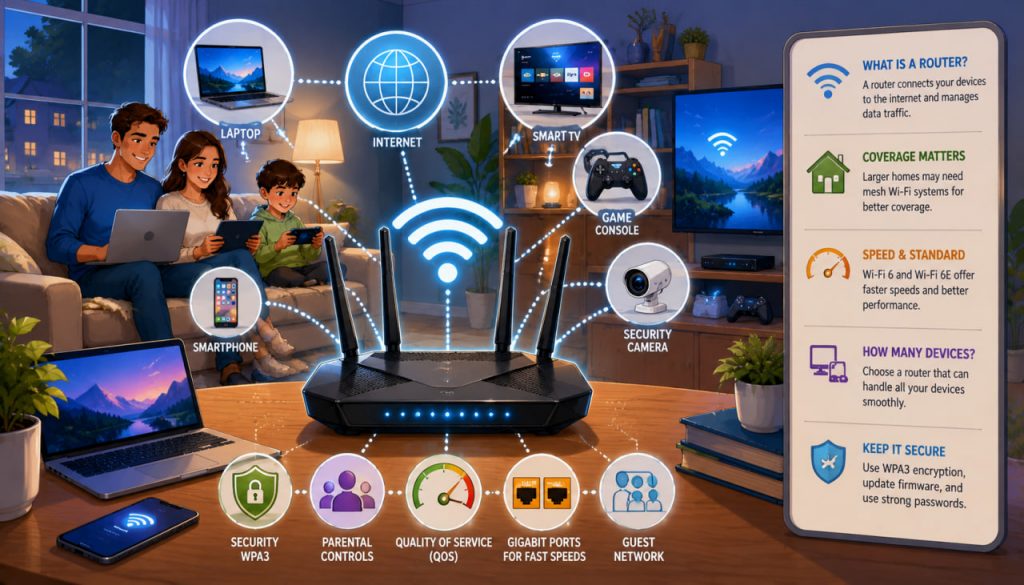
In today’s connected world, a router is one of the most important devices in any home or office. Whether you are streaming movies, attending video meetings, playing online games, managing smart-home devices, or simply browsing the internet, your router serves as the central hub that connects everything together.
Despite its importance, many people purchase routers without understanding what they do or which features actually matter. Marketing terms, technical specifications, and constantly evolving Wi-Fi standards can make choosing the right router seem confusing.
The good news is that understanding a few key concepts can make router selection much easier and help you build a faster, more reliable home network.
What Is a Router?
A router is a networking device that directs internet traffic between your internet connection and your connected devices.
Think of a router as a traffic controller.
It connects:
- Smartphones
- Computers
- Tablets
- Smart TVs
- Gaming consoles
- Security cameras
- Smart-home devices
The router ensures that data reaches the correct device efficiently.
Without a router, most modern home networks would not function properly.
How Does a Router Work?
Your internet service provider delivers internet access to your home through a modem or combined modem-router device.
The router then:
- Receives internet data
- Distributes connections to devices
- Manages wireless communications
- Provides security features
- Controls network traffic
Modern routers often handle dozens of connected devices simultaneously.
Why Router Quality Matters
Not all routers perform equally.
A low-quality router may cause:
- Slow speeds
- Connection drops
- Dead zones
- Lag during gaming
- Poor video-call quality
A better router can improve:
- Stability
- Coverage
- Security
- Device capacity
In many homes, upgrading the router provides a greater improvement than upgrading internet speed alone.
Understanding Wi-Fi Standards
One of the most important specifications is the Wi-Fi generation.
Current standards include:
- Wi-Fi 5 (802.11ac)
- Wi-Fi 6 (802.11ax)
- Wi-Fi 6E
- Wi-Fi 7
Generally speaking:
Wi-Fi 6 and newer standards offer better efficiency, higher capacity, and improved performance when many devices are connected simultaneously.
For most households today, Wi-Fi 6 provides an excellent balance of performance and cost.
Single-Band, Dual-Band, and Tri-Band Routers
Routers operate on wireless frequency bands.
Single-Band
Uses only:
- 2.4 GHz
Advantages:
- Lower cost
Disadvantages:
- Slower speeds
- More interference
Dual-Band
Uses:
- 2.4 GHz
- 5 GHz
Advantages:
- Better performance
- Greater flexibility
For most users, dual-band routers are the minimum recommended choice.
Tri-Band
Uses:
- 2.4 GHz
- Two separate high-speed bands
Advantages:
- Better performance in busy networks
- Improved handling of many devices
Ideal for larger households.
Coverage and Home Size
Router range depends on:
- Antenna design
- Building materials
- Floor plan
- Router placement
Large homes may require:
- Mesh systems
- Additional access points
Concrete walls, metal structures, and multiple floors can significantly reduce wireless coverage.
What Is a Mesh Wi-Fi System?
Mesh systems consist of multiple interconnected devices working together.
Benefits include:
- Wider coverage
- Reduced dead zones
- Seamless roaming
Instead of one powerful router attempting to cover the entire house, mesh systems distribute Wi-Fi throughout the property.
They are particularly useful for:
- Large homes
- Multi-story buildings
- Complex floor plans
Wired Connections Still Matter
Although Wi-Fi receives most attention, Ethernet connections remain important.
Advantages include:
- Lower latency
- Greater reliability
- Consistent speed
For:
- Gaming PCs
- Desktop computers
- Network storage systems
wired connections often outperform wireless alternatives.
Router Security Features
Security should never be overlooked.
Important features include:
- WPA3 encryption
- Automatic firmware updates
- Guest networks
- Parental controls
WPA3 is currently the most advanced widely available Wi-Fi security standard.
Keeping firmware updated helps protect against newly discovered vulnerabilities.
How Many Devices Can Your Router Handle?
Modern households often contain dozens of connected devices.
Examples include:
- Phones
- Laptops
- TVs
- Smart speakers
- Cameras
- Thermostats
A router designed for only a few devices may struggle under heavy loads.
Wi-Fi 6 and Wi-Fi 7 routers are particularly effective at managing multiple simultaneous connections.
Gaming and Streaming Considerations
Gamers and streamers often require:
- Low latency
- Stable connections
- High throughput
Useful features include:
- Quality of Service (QoS)
- Multi-gigabit ports
- Wi-Fi 6 or Wi-Fi 7 support
QoS allows routers to prioritize important traffic such as gaming or video conferencing.
Expert Perspective
Computer networking expert Radia Perlman, often called the “Mother of the Internet” for her contributions to network protocols, has emphasized the importance of intelligent network design and reliable data routing. Her pioneering work helped create many of the networking principles that modern routers use to move information efficiently across digital networks.
Common Router Buying Mistakes
Many buyers focus only on advertised speed.
Other important considerations include:
- Coverage
- Reliability
- Security
- Number of devices
- Future compatibility
A slightly more expensive router often provides a significantly better long-term experience.
What Should Most People Buy?
For most households in 2026:
A reputable Wi-Fi 6 dual-band router offers the best balance of performance, security, compatibility, and price.
Consider a mesh system if:
- Your home exceeds approximately 150–200 square meters
- You have multiple floors
- You experience dead zones
Power users may benefit from Wi-Fi 6E or Wi-Fi 7 hardware.
Conclusion
A router is the heart of a modern home network, connecting devices to the internet and managing data traffic efficiently. Choosing the right router depends on home size, internet speed, device count, and future needs.
For most users, a modern Wi-Fi 6 dual-band router provides excellent performance and security. Larger homes may benefit from mesh systems, while gamers and technology enthusiasts may prefer higher-end models with advanced networking features.
Investing in a quality router can dramatically improve everyday internet experiences, often more than increasing internet speed alone.
Interesting Facts
- Some modern households connect more than 50 devices to a single router.
- Wi-Fi signals travel through walls but are weakened by concrete and metal.
- The term “router” comes from its function of routing data packets between networks.
- Mesh systems can cover entire multi-story homes with a single unified network.
- Ethernet connections are still faster and more reliable than most wireless connections.
- Wi-Fi 7 can achieve theoretical speeds many times faster than older Wi-Fi standards.
Glossary
- Router — A device that directs network traffic between devices and the internet.
- Wi-Fi — Wireless networking technology used for internet connectivity.
- Mesh Network — A system of multiple wireless nodes working together to provide coverage.
- Ethernet — A wired networking technology.
- Latency — The delay between sending and receiving data.
- WPA3 — A modern wireless security standard.
- QoS (Quality of Service) — Technology that prioritizes important network traffic.