The internet has become an essential part of modern life. We use it for work, communication, banking, shopping, entertainment, and countless other activities. As more personal information moves online, concerns about privacy, security, and unrestricted access to information continue to grow.
One technology that has become increasingly popular in recent years is the Virtual Private Network, commonly known as a VPN. Millions of people use VPN services daily, but many users are still unsure about what a VPN actually does and how to choose the right one.
Understanding the strengths and limitations of VPN technology can help users make informed decisions and improve their online experience.
What Is a VPN?
VPN stands for Virtual Private Network.
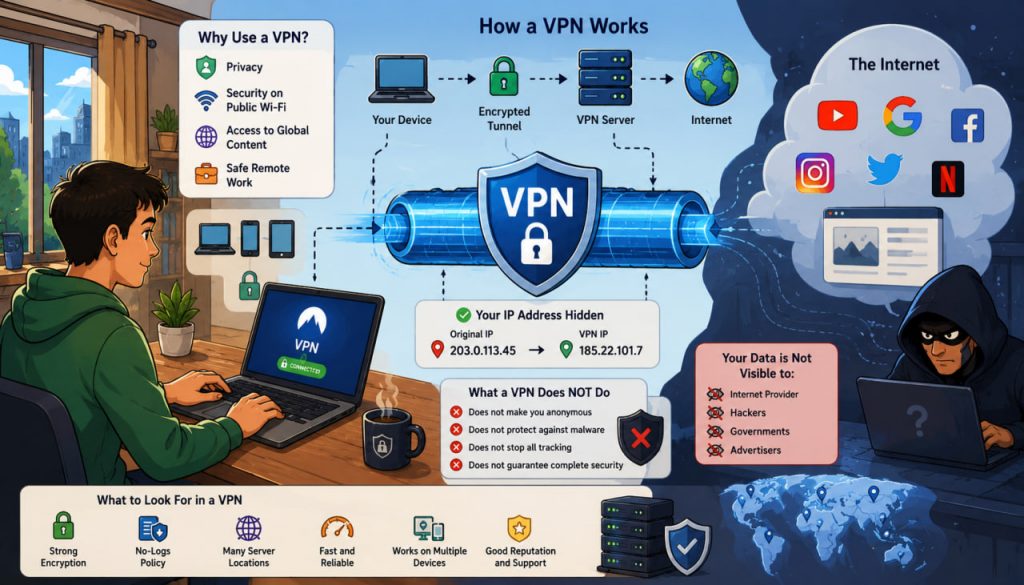
A VPN creates an encrypted connection between your device and a remote server operated by the VPN provider. Instead of connecting directly to websites and online services, your internet traffic first passes through the VPN server.
As a result:
- Your internet provider sees that you are connected to a VPN.
- Websites see the VPN server’s address rather than your direct internet address.
- Data traveling between your device and the VPN server is encrypted.
This process helps improve privacy and security in many situations.
How Does a VPN Work?
Normally, when you visit a website, your device connects directly to that website through your internet service provider.
With a VPN enabled:
- Your device encrypts outgoing data.
- The data travels through a secure tunnel to the VPN server.
- The VPN server forwards the request to the website.
- The website sends information back through the VPN server.
- The VPN decrypts the response and delivers it to your device.
This creates an additional layer of protection between users and the wider internet.
The VPN server effectively acts as an intermediary between you and the websites you visit.
Why Do People Use VPNs?
People use VPNs for several different reasons.
Privacy
A VPN can make it more difficult for third parties to associate online activity with a specific internet connection.
Security on Public Wi-Fi
Public networks in hotels, airports, cafés, and other locations can present security risks.
VPN encryption helps protect data from certain types of interception while using these networks.
Remote Work
Many companies use VPN technology to provide employees with secure access to internal business systems.
Access to Global Content
Some online services provide different content depending on geographic location. VPNs can sometimes allow users to connect through servers located in other countries.
What a VPN Does Not Do
One of the biggest misconceptions is that a VPN makes users completely anonymous.
This is not true.
A VPN does not automatically:
- Protect against malware
- Prevent phishing attacks
- Hide all online activity
- Eliminate tracking techniques
- Guarantee complete anonymity
Users should view VPNs as one layer of a broader cybersecurity strategy rather than a universal solution.
Free VPN vs Paid VPN
Many users are attracted to free VPN services.
While some legitimate free VPNs exist, they often have limitations such as:
- Data caps
- Slower speeds
- Fewer server locations
- Reduced features
In some cases, free providers may generate revenue through advertising or data collection.
Paid VPN services generally offer:
- Faster performance
- More server locations
- Better customer support
- Stronger privacy policies
- Additional security features
For users who rely heavily on VPNs, paid services are often the more reliable choice.
What Features Should You Look For?
Choosing a VPN involves evaluating several important factors.
Strong Encryption
Modern VPNs typically use advanced encryption standards that make intercepted data extremely difficult to read.
No-Logs Policy
A no-logs policy means the provider claims not to store records of user activity.
Because privacy is one of the main reasons people use VPNs, this feature is often considered important.
Server Network
A larger server network generally provides:
- Better performance
- More location options
- Improved reliability
Speed
VPNs introduce an additional step in the connection process.
High-quality providers minimize speed reductions through optimized infrastructure.
Device Compatibility
Good VPN services support:
- Windows
- macOS
- Android
- iPhone and iPad
- Linux
- Smart TVs
- Routers
Expert Perspective on VPN Security
Cybersecurity expert Bruce Schneier has frequently emphasized that digital security depends on layers rather than a single tool.
“Security is a process, not a product.”
This principle applies directly to VPNs. While they can improve privacy and security, they are most effective when combined with strong passwords, software updates, multi-factor authentication, and safe online habits.
Which Type of VPN Is Best?
The answer depends on your needs.
For General Privacy
A reputable commercial VPN with a transparent privacy policy is usually sufficient.
For Travelers
Services with large international server networks are often the most practical.
For Remote Workers
Corporate VPNs provided by employers are typically designed for secure access to internal resources.
For Casual Users
Ease of use, reliability, and speed are often more important than advanced technical features.
The best VPN is not necessarily the most expensive one—it is the one that meets your specific requirements.
Are VPNs Legal?
In most countries, using a VPN is completely legal.
Businesses, governments, educational institutions, and individuals use VPNs every day for legitimate purposes.
However, laws vary between countries, and users should always understand local regulations before using any online privacy tool.
The Future of VPN Technology
As concerns about online privacy continue to grow, VPN technology is evolving.
Modern providers increasingly offer:
- Threat protection features
- Password monitoring
- Identity protection tools
- Advanced encryption protocols
At the same time, websites and online services are becoming more sophisticated in how they identify users.
This ongoing technological competition is likely to shape the future of online privacy.
Conclusion
A VPN is a valuable tool that can improve privacy, enhance security on public networks, and provide greater control over internet connections. However, it is not a magic solution for every online threat.
The most important factors when choosing a VPN are transparency, security, reliability, speed, and a strong privacy reputation. By understanding what VPNs can and cannot do, users can make smarter decisions and enjoy a safer online experience.
Interesting Facts
- VPN technology was originally developed to help businesses create secure remote connections.
- Millions of remote workers use VPNs every day to access company networks.
- Encryption used by modern VPNs would take an impractical amount of time to break using current computing technology.
- Many large organizations operate private VPN infrastructures for employees.
- Public Wi-Fi networks are among the most common situations where VPN protection can be useful.
- The global VPN market has grown rapidly as awareness of online privacy has increased.
Glossary
- VPN (Virtual Private Network) — A technology that creates an encrypted connection between a device and a remote server.
- Encryption — The process of converting information into a protected form that unauthorized parties cannot easily read.
- IP Address — A numerical identifier assigned to devices connected to a network.
- No-Logs Policy — A provider policy stating that user activity records are not stored.
- Multi-Factor Authentication (MFA) — A security method that requires multiple forms of verification before granting access.