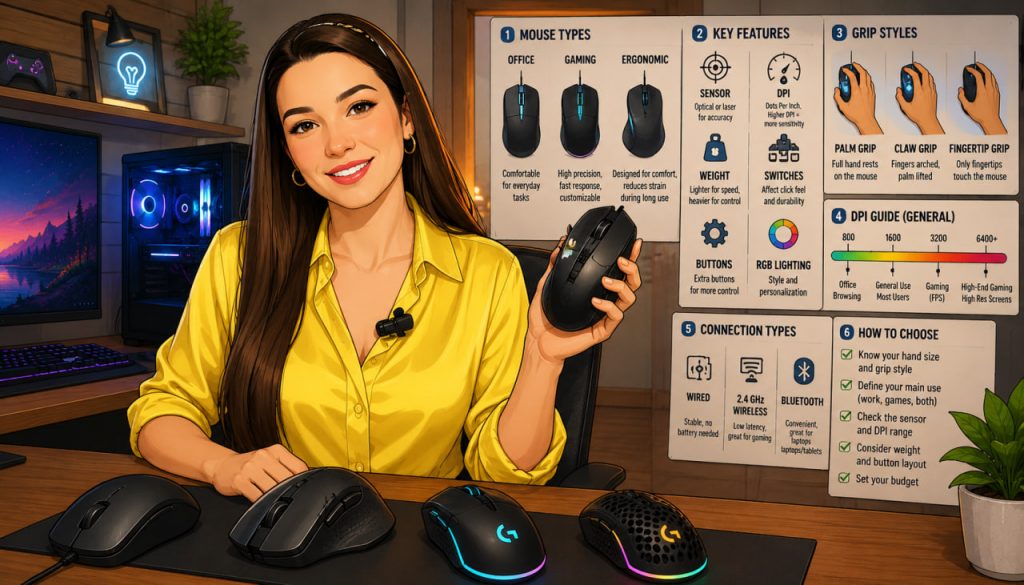
A computer mouse may seem like a simple accessory, but it has a major impact on productivity, comfort, precision, and even long-term hand health. Whether you are gaming, editing videos, working in an office, programming, or simply browsing the internet, the right mouse can significantly improve your experience.
Modern computer mice have evolved far beyond basic optical devices. Today’s models include advanced sensors, ergonomic designs, programmable buttons, wireless technologies, and highly specialized gaming features.
But with so many options available, how do you choose the best mouse for your needs?
Why Choosing the Right Mouse Matters
People interact with a mouse thousands of times every day. A poorly designed mouse can cause:
- Hand fatigue
- Wrist discomfort
- Reduced precision
- Slower workflow
Meanwhile, a good mouse improves:
- Accuracy
- Speed
- Comfort during long sessions
- Overall efficiency
For professionals and gamers who spend hours at a computer, the difference becomes especially noticeable.
The Main Types of Modern Mice
Modern PC mice generally fall into several categories.
Office and Everyday Mice
These models are designed for:
- General productivity
- Browsing
- Office applications
They usually focus on:
- Simplicity
- Quiet clicks
- Comfortable ergonomics
- Battery efficiency
Such mice are often affordable and practical for everyday use.
Gaming Mice
Gaming mice are optimized for speed and precision.
Common features include:
- High-performance sensors
- Adjustable DPI settings
- Extra programmable buttons
- RGB lighting
- Faster response times
Gaming mice are especially useful in competitive games requiring fast reactions.
Ergonomic Mice
Ergonomic mice are designed to reduce strain on the hand and wrist.
Some models use:
- Vertical designs
- Thumb support
- Natural hand positioning
These mice are popular among users who spend long hours working at computers.
Understanding DPI and Sensor Precision
One of the most advertised mouse features is DPI, which stands for dots per inch.
DPI measures how sensitive the mouse is to movement.
Higher DPI means:
- Faster cursor movement
- Greater sensitivity
However, extremely high DPI is not always better.
For most users:
- Moderate DPI settings provide better control
- Precision matters more than maximum numbers
Professional gamers often prioritize sensor accuracy and consistency rather than simply the highest DPI.
Technology reviewer Rocket Jump Ninja explained:
“Shape and comfort matter more than sensor specs once you reach modern sensor quality.”
This highlights how ergonomics often outweigh marketing numbers.
Wired vs Wireless Mice
Wireless technology has improved dramatically in recent years.
Wired Mice
Advantages:
- Stable connection
- No charging required
- Lower latency in some cases
Still preferred by some competitive gamers.
Wireless Mice
Advantages:
- Cleaner desk setup
- Greater freedom of movement
- Improved portability
Modern premium wireless mice now offer response times nearly identical to wired models.
Ergonomics and Hand Health
Ergonomics are extremely important for long-term comfort.
Poor mouse posture can contribute to:
- Wrist strain
- Finger fatigue
- Repetitive stress injuries
Important ergonomic factors include:
- Mouse size
- Hand grip style
- Weight
- Shape
A mouse that fits comfortably in the hand reduces unnecessary tension.
Grip Styles and Mouse Shape
Different users hold mice differently.
The three main grip styles are:
- Palm grip
- Claw grip
- Fingertip grip
Palm Grip
The entire hand rests on the mouse.
Best for:
- Comfort
- Relaxed movement
Claw Grip
The fingers arch slightly while controlling the mouse.
Popular among gamers needing faster movement.
Fingertip Grip
Only fingertips touch the mouse.
Allows quick and precise adjustments.
Choosing the correct mouse shape for your grip style is very important.
Mouse Weight: Light or Heavy?
Mouse weight affects movement speed and control.
Lightweight Mice
Advantages:
- Faster movement
- Less fatigue during gaming
Popular in competitive esports.
Heavier Mice
Advantages:
- More stability
- Controlled movement
Preferred by some office users and designers.
Personal preference plays a major role here.
Extra Buttons and Customization
Many modern mice include programmable buttons.
These can improve productivity by allowing:
- Shortcut commands
- Macros
- Quick application switching
Gaming mice may include numerous side buttons for complex controls.
However, excessive buttons may also increase complexity unnecessarily for casual users.
RGB Lighting and Aesthetics
RGB lighting has become common in gaming peripherals.
Benefits include:
- Visual customization
- Matching desk setups
- Better visibility in dark rooms
For many users, RGB is mainly aesthetic rather than functional.
Battery Life and Charging
Wireless mice vary greatly in battery performance.
Some models offer:
- Weeks or months of battery life
- USB-C charging
- Wireless charging support
Battery efficiency has become a major factor in modern mouse design.
Which Mouse Is Best for Different Users?
For Office Work
- Comfortable ergonomic design
- Quiet clicks
- Reliable wireless connection
For Gaming
- Accurate sensor
- Lightweight construction
- Fast response time
For Creative Professionals
- Precision tracking
- Extra programmable buttons
- Comfortable long-term use
For Travel
- Compact wireless mouse
- Portable design
The best mouse depends more on individual usage than on marketing claims.
The Future of Computer Mice
Modern mice continue evolving with technologies such as:
- AI-assisted gestures
- Adaptive sensitivity
- Advanced haptic feedback
- Motion tracking improvements
Even as touchscreens and voice interfaces grow, the mouse remains one of the most important tools for precise computer interaction.
Interesting Facts
- The first computer mouse was invented in the 1960s.
- Some gaming mice can track movements with extremely high precision.
- Ergonomic vertical mice are designed to reduce wrist strain.
- Wireless mouse latency has improved dramatically over the last decade.
- Lightweight gaming mice have become increasingly popular in esports.
Glossary
- DPI (Dots Per Inch) — A measurement of mouse sensitivity.
- Latency — Delay between movement and system response.
- Sensor — The component that tracks mouse movement.
- Ergonomics — Design focused on comfort and reducing physical strain.
- Macro — A programmed shortcut that performs multiple actions automatically.